Pachli 3.3.0 is now available. This release allows you to switch between writing posts and browsing timelines using Android’s “Recents” screen, adjusts the UI when writing a post, and has a number of bug fixes.
New features and other improvements #
Allow multiple simultaneous “compose” tasks #
The Android “Recents” screen shows you recently opened applications and allows you to quickly switch between them. You typically access it with the “square” navigation button, or by swiping up from the bottom of the screen if gesture-navigation is enabled.
More accurately, it shows your recent tasks. Most apps typically have a single task, but applications can create new tasks, and each task appears separately in the list. For example, the GMail app does this when you write new e-mails.
Pachli now does this too, creating a new task every time you create or edit a post.
This allows a number of new behaviours. For example:
- If you want to write a post that copies text from multiple posts you can start writing the post, then open the “Recents” list, switch back to your timeline, and copy text from other posts.
- You can have multiple posts open for writing simultaneously, and switch between them.
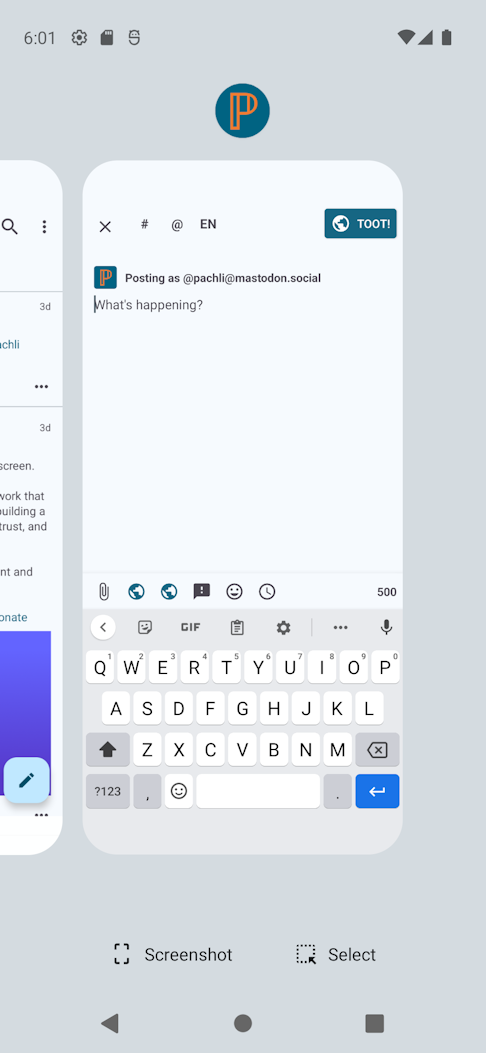
This screenshot shows the open “Recents” list after starting to write a post in Pachli. The “Compose” task is present, and just off the left of the screen you can see the Pachli task that contains the timeline.
This also fixes #1555 reported by anauta, where if you were in the middle of writing a post and tapped a Pachli notification the post you were writing was lost.
Updates to translations #
Languages with updated translations are:
- Estonian by Priit Jõerüüt
- French by Terry L
- German by Kachelkaiser
- German by Thomas Cloer
- Irish by Aindriú Mac Giolla Eoin
- Latvian by Edgars Andersons
- Slovak by Russssty
- Spanish by Juan M Sevilla
If you would like to help improve Pachli’s translation in to your language there’s information on how you can contribute.
Significant bug fixes #
Move the “Toot” button to top right #
The UI changes to support writing quotable posts inadvertently caused a problem for people using Pachli on smaller screens. It was possible for the “Toot” button to be pushed partially off the screen.
This was reported by @frauxirah@chaos.social, and Jerome in #206.
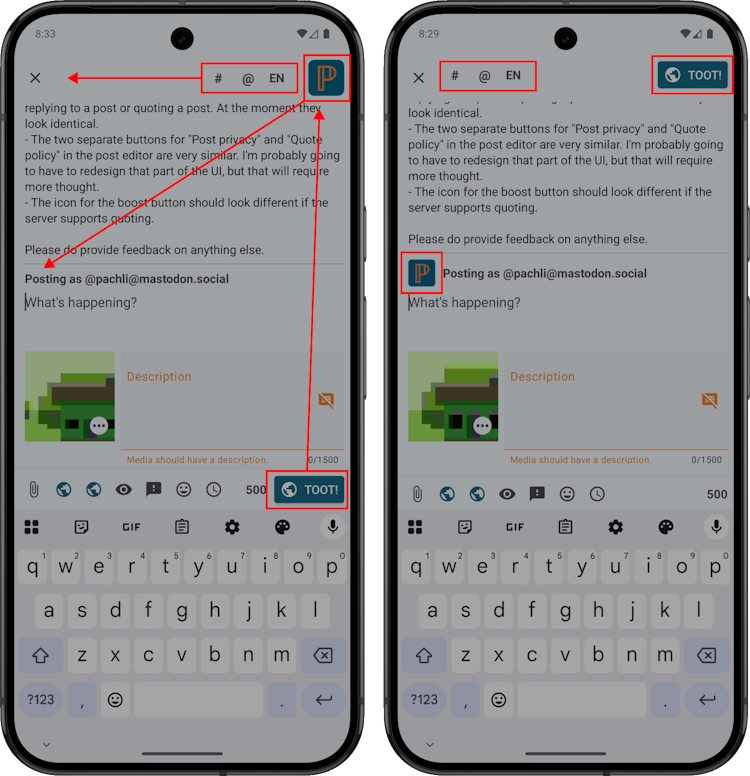
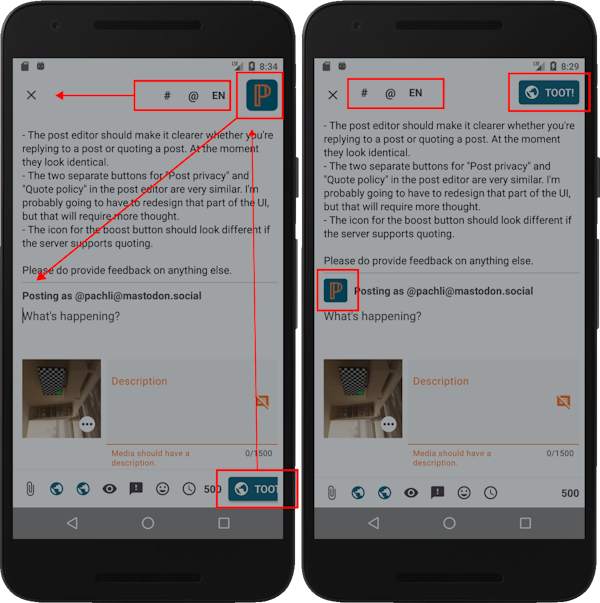
To fix this the “Toot” button has been moved. It is now at the top right of the screen when writing a post, consistent with Android UX guidelines. The other controls at the top of the screen (to insert a #, @, or change the language) have been moved to the left. Your account’s avatar has moved to the “Posting as…” line.
These images show the UI before (left) and after (right) the changes on two different sizes of (simulated) device. The red arrows and boxes indicate which parts of the UI have moved and where they have moved to.
As well as making space on smaller devices it also makes it harder to press the “Toot” button by accident, as there are no other tappable bits of the UI nearby.
This Mastodon thread has more details about this change.
Don’t crash if bio of suggested account is empty #
Mastodon’s “Account suggestion” feature can suggest accounts that don’t have a bio / description. Pachli wasn’t handling that case, and crashing.
Ignore quote, quote_update notifications with a missing post #
A Mastodon bug can cause you to receive notifications that someone has quoted one of your posts, or a post you have quoted has been updated, without referencing the post in question. This is contrary to the Mastodon specification, so Pachli now ignores them (which also prevents a crash). There’s nothing useful Pachli can do with these notifications – for example, telling you that someone has quoted one of your posts, without being able to show you the post in question, is not helpful.
Show animated avatars in preview card bylines #
The “byline feature”, introduced in Pachli 2.7.0, was showing the avatars of authors in the byline, but wasn’t animating those avatars (if appropriate). Now it does.
Prevent crash when scrolling through notifications #
A bug in the Google library used for displaying lists of items (e.g., notifications) was occasionally causing a crash. This has been worked around, until Google releases a fix.
Thank you #
Thank you to everyone who took the time to report issues and provide additional followup information and screenshots.
Download Pachli 3.3.0 from Google Play, F-Droid, or the GitHub release page.