Pachli 3.4.0 is now available. This release shows you hashtags on post that were previously hidden, allows you to search for posts that do / do not quote other posts, works around security certificate problems, and has fixes for quotes, media playback, and more.
New features and other improvements #
Show hidden hashtags at the end of the content #
As you probably know, the content of posts on Mastodon and similar servers can contain hashtags, and you can follow hashtags so all posts with the hashtag appear in your home feed.
Posts can also contain “hidden” or “out-of-band” hashtags. Mastodon doesn’t let you create posts with hidden hashtags, but other Fediverse software does – for example, Piefed.
If a post contains a hidden hashtag, and you follow the hashtag, the post will appear in your feed.
Previously, Pachli wasn’t displaying the hidden hashtags, which could cause confused users asking “Why is this post in my home feed?”.
Now, if there are any hidden hashtags Pachli appends a paragraph to the post containing all of them, so it’s still clear why your feed contains the post.
Feedback from NeatNit (@neatnit@fosstodon.org), Harald Hannelius (@harald@mementomori.social) prompted the work to fix this.
Search improvements #
Show a count of active filters in the search filter badge #
The badge on the “filter” icon when search filters are active now tells you how many different filters are active.
Searching for posts that quote other posts #
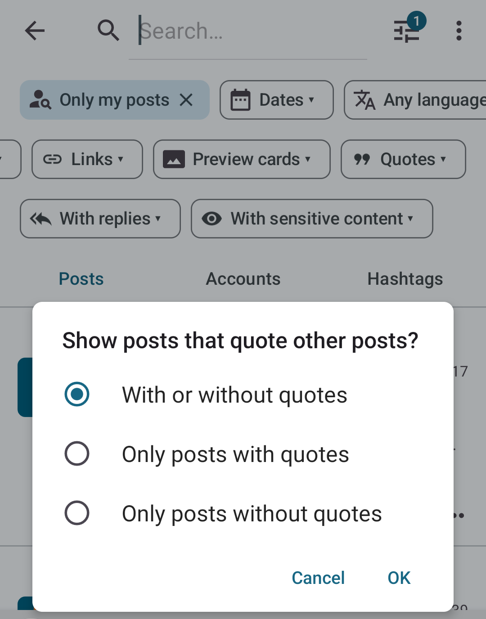
Mastodon 4.4.5 and above supports limiting searches to only posts that quote or other posts (or only posts that don’t quote other posts).
If your account is on a server running Mastodon 4.4.5 or greater Pachli now shows this as an additional search filter.
When searching, tap the “filters” button and the “Quotes” option will appear at the right end of the second row. Tap this to open a dialog to choose from the possible options.
This screenshot shows this, and also highlights the filter badge when one other filter is already active.
Trust new intermediate certificates from Sectigo #
If you use an Android 7 device you may have had problems connecting to some servers if the server’s security certificate was issued by Sectigo, as Android 7 refuses to connect.
This is similar to the problem with Let’s Encrypt certificates fixed with Pachli 2.5.0.
This problem was reported by Amélie Cornélis (@AmelieCornelis@freeradical.zone), and is fixed.
Updates to translations #
Languages with updated translations are:
- Chinese (Traditional Han script) by 黃冠霖 (their first contribution to Pachli)
- Estonian by Priit Jõerüüt
- French by Terry L
- German by Kachelkaiser
- Irish by Aindriú Mac Giolla Eoin
- Kabyle by ButterflyOfFire
- Latvian by Edgars Andersons
- Polish by Łukasz Horodecki
- Slovak by Russssty
- Spanish by Juan M Sevilla
If you would like to help improve Pachli’s translation in to your language there’s information on how you can contribute.
Significant bug fixes #
Don’t crash if a poll has a missing votesCount #
D.Hamlin (@dhamlinmusic@dragonscave.space) reported problems loading posts containing polls missing the count of votes on the poll. This should be fixed with #2117.
Displaying posts with quotes #
There was a lot of useful feedback about how Pachli displays quotes and related bugs which resulted in many fixes.
Don’t show quotes if the quoting post has a closed content warning #
Jules (@blitter@mastodon.catgirl.cloud) and Sarah Peper (@jay_peper@chaos.social) both reported (#2037) that if a post quoted another post and had a content warning, Pachli was still displaying the quote if you hadn’t clicked through the content warning on the post that quoted it.
This breaks a boost-with-content-warning usage of quoted posts, and was fixed in #2098.
Handle quotes on Friendica/Akkoma servers #
Kristian (@z428eu@quietmoon.org) and blit @blit@mastodon.ml both reported (#2043) problems loading posts containing quotes on servers running Friendica or Akkoma.
Both these platforms implemented quote support before Mastodon, and Mastodon’s implementation has re-used some of their work in an incompatible fashion.
Pachli now recognises this, and will display quotes correctly if you use a Friendica or Akkoma server (#2133).
Improve handling of “quote links” #
Mastodon includes a “quote link” in posts containing a quote, for backwards compatibility with clients that do not support quotes.
In some cases Pachli was removing these links when it shouldn’t (reported by Nordnick (@nick@mammuthus.de), fixed in #2126), and some servers return those links wrapped in extra HTML elements, and Pachli now handles those too (#2137).
Show quotes in boosted posts #
Mauricio Teixeira (@badnetmask@hachyderm.io) reported a problem where boosted posts containing a quote could cause a crash. He provided a detailed set of reproduction steps, which was very helpful in tracking down the problem. This was fixed in #2113.
Correctly show placeholder for blocked quotes #
Kalle Kniivilä (@kallekn@mastodonsweden.se) reported #2052, where a post containing a quote you couldn’t see wasn’t showing the correct placeholder to indicate a quote was present.
This turned out to be both a bug in Pachli and a bug in Flipboard, where Flipboard was not correctly approving quotes. Both bugs have now been fixed (#2102 for Pachli, and by Gregory Scallan (@greg@flipboard.social) for Flipboard).
Media playback #
Don’t auto-resume playback if the user scrubs media #
Fluchtkapse (@fluchtkapsel@nerdculture.de) reported (#2112) pausing a video, scrubbing through the video to a new point, then stopping, caused the video to resume playing instead of remaining paused. Fixed with #2118.
Ensure media playback starts if there was no preview image #
@TKb0iZ@sunny.garden reported audio files were loading without displaying the playback controls.
Further investigation showed this was happening with any media that didn’t display a preview image; typically audio files, but also video files if you had disabled media previews.
This was fixed with #2084
Pachli’s database #
Pachli keeps a database of information it needs for normal operation on your device. A number of issues with this are fixed or improved in this release.
Trim database cache at startup if needed #
Background #
To operate efficiently Pachli keeps a database on your device, caching information you have received from your server; posts, how they relate to each other, how you have interacted with them (e.g., have you clicked through a post’s content warning?), etc.
This database is encrypted, associated with your account, and deleted when you remove your account from Pachli or when you delete Pachli. It is not accessible to other applications, and is never sent off your device (unless you have opted in to Google’s device backup, see the privacy policy for more).
Left untended, Pachli’s database on your device would grow without bounds.
To ensure this doesn’t happen, approximately every 12 hours, and if your device is idle, Pachli cleans the database, removing cached items no longer referenced from your cached timelines. This process typically takes a second or less.
Unfortunately, some Android manufacturers, in a quest to artificially inflate their battery performance numbers, aggressively prevent applications from performing any sort of background work.
Manufacturers known to do this include:
- Huawei
- Xiaomi
- OnePlus
- Samsung
and more (see Don’t kill my app!).
Before Pachli supported quotes this problem went unnoticed. Over time Pachli would take a bit longer to work on these devices, and would use more and more space, but it would still work. Because Pachli does not report any external telemetry it was not possible for the developers to proactively discover this was happening.
This also explains why notification delivery on these devices may be sporadic if you don’t use Unified Push. Android on these devices stops the periodic tasks Pachli launches to fetch new notifications.
This changed when Pachli supported quotes, as Pachli has to manipulate more data to do this. With the normal size of the database – a few hundred to a thousand posts – this is not a problem. However, if you have been using Pachli for a while on a device from one of these manufacturers you may have tens or even hundreds of thousands of cached posts.
Creating your home timeline – which should normally take milliseconds – could take multiple seconds, or even crash because Pachli needed more memory than was available.
People who reported these issues and helped with debugging include:
- arclight (@arclight@oldbytes.space)
- A Flock of Beagles (@burnitdown@beige.party)
- Irene (@irenetherogue@freesky.world)
- Kommadieb (@kommadieb@norden.social)
- langhaarschneider (@langhaarschneider@sueden.social)
- Luchuco Cadáver (@lufertec@mastodon.uy)
- MaMü (@mamue@norden.social)
- Matthew Booth (@mattb@hachyderm.io)
- neutronwrangler (@neutronwrangler@mastodon.org.uk)
- O Galdo (@pcgaldo@mastodon.pcgaldo.com)
- Radgryd (@Radgryd@mstdn.games)
- Sashin (@sashin@veganism.social)
- ScottMGS (@ScottMGS@justme.masto.host)
- ticho (@ticho@mas.to)
- Tomasz (@tomo@floss.social)
What Pachli does now #
Every time you start Pachli it performs a quick check to see how many posts are cached. If it’s too many then the database is trimmed immediately.
This is a quick fix while I think of a better one.
What you can do #
- Don’t buy devices from these manufacturers in the future.
- Open Don’t kill my app!, and click on the entry for your device’s manufacturer (e.g., Huawei’s page). You will see suggestions for settings you can change on your device that will, sometimes, fix the problem, at no cost to your effective battery life.
Ensure database migrations work when upgrading from very old versions #
To support new features the structure of Pachli’s database is sometimes modified from one release to the next.
A bug caused those modifications to be missed if you were upgrading from a very old Pachli version (2.12.0 or older), causing a crash when the new version starts.
This was reported by Sebastian Wagner in #2062 and Florian Berger (@flberger@nerdculture.de) in #2119, and fixed with #2129.
Thank you #
Thank you to everyone who took the time to report issues and provide additional followup information and screenshots.
Download Pachli 3.4.0 from Google Play, F-Droid, or the GitHub release page.